1. EKS node viewer
yum install -y go
go install github.com/awslabs/eks-node-viewer/cmd/eks-node-viewer@v0.5.0
cd ~/go/bin
./eks-node-viewer
✅ 최종 실행 화면

2. 개념
➜ 파드에 대한 오토스케일링 기법 - HPA, VPA
➜ 노드에 대한 오토스케일링 기법 - CA, karpenter
➜ 스케일링의 판단기준이 되는 지표는 수집된 metric
✅ HPA(horizontal pod autoscaler) - 수평 스케일링 (수량을 확장, 축소 scale out/in)
✅ k8s의 pod 오토스케일링 기능으로 수평적 스케일링을 동적으로 수행
✅ VPA(vertical pod autoscler) - 수직 스케일링 (용량을 확장, 축소 scale up/down)
✅ k8s의 pod 오토스케일링 기능으로 수직적 스케일링을 동적으로 수행
3. TEST
curl -s -O https://raw.githubusercontent.com/kubernetes/website/main/content/en/examples/application/php-apache.yaml

cat php-apache.yaml | yh

kubectl apply -f php-apache.yaml
➜ kubectl exec -it deploy/php-apache -- cat /var/www/html/index.php
✅ 실행 화면

➜ Watch mode 실행 (터미널 새로 open)
kubectl get hpa,pod
kubectl top pod
kubectl top node

watch -d ‘kubectl get hpa,pod;echo;kubectl get top pod ;echo;kubectl get top node’

➜ 다른 터미널에 아래 명령어 입력
(bs-sa-user4@myeks:default) [root@myeks-bastion-EC2 ~]# curl -s 192.168.1.10;echo
OK!

(bs-sa-user4@myeks:default) [root@myeks-bastion-EC2 ~]# kubectl autoscale deployment php-apache --cpu-percent=50 --min=1 --max=10
(bs-sa-user4@myeks:default) [root@myeks-bastion-EC2 ~]# kubectl get hpa

➜ prometheus
✅ Kubernetes / Horizontal Pod Autoscaler ID : 17125
kubectl run -i \
    --tty load-generator \
    --rm --image=busybox \
    --restart=Never \
    -- /bin/sh -c "while sleep 0.01; do wget -q -O- http://php-apache; done"
✅ 지우기 : kubectl delete deploy,svc,hpa,pod --all
4. Vertical Pod Autoscaler를 사용하여 포드 리소스 조정
(bs-sa-user4@myeks:default) [root@myeks-bastion-EC2 ~]# kubectl create ns vpa
namespace/vpa created
(bs-sa-user4@myeks:default) [root@myeks-bastion-EC2 ~]# helm repo add fairwinds-stable https://charts.fairwinds.com/stable
"fairwinds-stable" has been added to your repositories
(bs-sa-user4@myeks:default) [root@myeks-bastion-EC2 ~]# helm install vpa fairwinds-stable/vpa --namespace vpa
NAME: vpa
LAST DEPLOYED: Fri Oct  4 04:46:03 2024
NAMESPACE: vpa
STATUS: deployed
REVISION: 1
NOTES:
Congratulations on installing the Vertical Pod Autoscaler!

Components Installed:
  - recommender
  - updater
  - admission-controller

To verify functionality, you can try running 'helm -n vpa test vpa'
(bs-sa-user4@myeks:default) [root@myeks-bastion-EC2 ~]# helm repo update
Hang tight while we grab the latest from your chart repositories...
...Successfully got an update from the "eks" chart repository
...Successfully got an update from the "fairwinds-stable" chart repository
...Successfully got an update from the "prometheus-community" chart repository
...Successfully got an update from the "geek-cookbook" chart repository
...Successfully got an update from the "stable" chart repository
...Successfully got an update from the "bitnami" chart repository
Update Complete. ⎈Happy Helming!⎈
(bs-sa-user4@myeks:default) [root@myeks-bastion-EC2 ~]# kubectl get pod -n vpa
NAME                                        READY   STATUS    RESTARTS   AGE
vpa-admission-controller-56484bb8cd-gl6fr   1/1     Running   0          20s
vpa-recommender-855ddb7454-cwpt9            1/1     Running   0          20s
vpa-updater-69878b9879-q6t8s                1/1     Running   0          20s
➜ nano hamster.yaml
apiVersion: "autoscaling.k8s.io/v1"
kind: VerticalPodAutoscaler # VPA
metadata:
  name: hamster-vpa
spec:

  targetRef:
    apiVersion: "apps/v1"
    kind: Deployment
    name: hamster
  resourcePolicy:
    containerPolicies:
      - containerName: '*'
        minAllowed:
          cpu: 100m
          memory: 50Mi
        maxAllowed:
          cpu: 1
          memory: 500Mi
        controlledResources: ["cpu", "memory"]
---
apiVersion: apps/v1
kind: Deployment
metadata:
  name: hamster
spec:
  selector:
    matchLabels:
      app: hamster
  replicas: 2
  template:
    metadata:
      labels:
        app: hamster
    spec:
      securityContext:
        runAsNonRoot: true
        runAsUser: 65534 # nobody
      containers:
        - name: hamster
          image: registry.k8s.io/ubuntu-slim:0.1
          resources:
            requests:
              cpu: 100m
              memory: 50Mi
          command: ["/bin/sh"]
          args:
            - "-c"
            - "while true; do timeout 0.5s yes >/dev/null; sleep 0.5s; done"
✅ kubectl apply -f hamster.yaml
➜ 새로운 터미널
[hamster apply 후]

kubectl get vpa

kubectl get vpa -w # hamster watch mode
kubectl get hpa,pod
kubectl top pod
kubectl top node

watch -d ‘kubectl get hpa,pod;echo;kubectl top pod ;echo;kubectl top node’
✅ 실행 결과

➜ VPC 문제 파악
kubectl get events --sort-by=".metadata.creationTimestamp" | grep VPA
✅ Kubernetes 클러스터에서 발생한 모든 이벤트를 시간 순서대로 정렬한 후, 그 중에서 VPA와 관련된 이벤트만을 추출하여 보여줌
➜ auto scaling
aws autoscaling \
  update-auto-scaling-group \
  --auto-scaling-group-name eks-ng1-aac92a7e-a0c4-e39b-99c2-b0ac410d0ac4  \
  --min-size 3 \
  --max-size 6 \
  --desired-capacity 3
✅ cluster 이름만 myeks로 변경
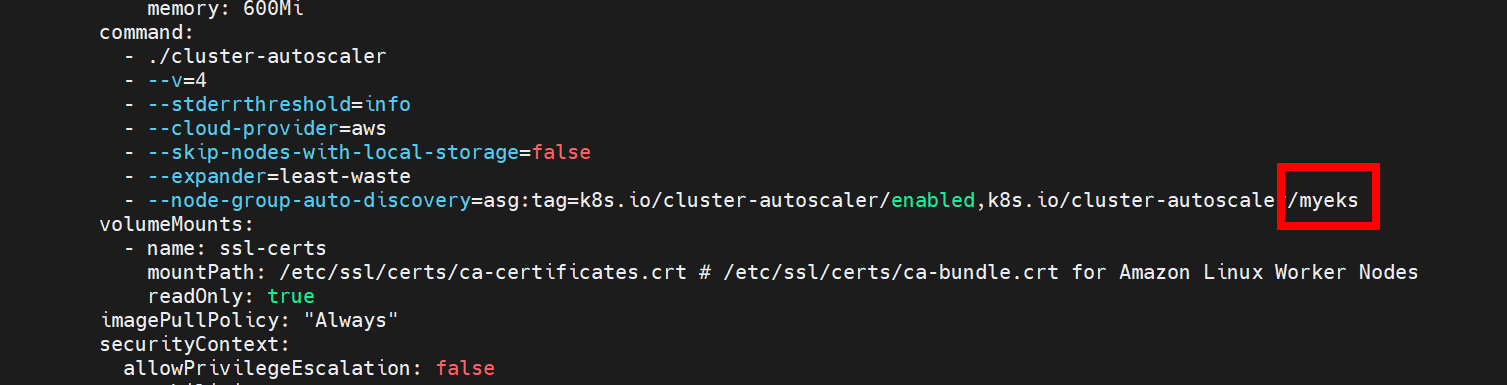
➜ (bs-sa-user4@myeks:default) [root@myeks-bastion-EC2 ~]# kubectl apply -f cluster-autoscaler-autodiscover.yaml
➜ (bs-sa-user4@myeks:default) [root@myeks-bastion-EC2 ~]# kubectl get pod -n kube-system | grep cluster-autoscaler
**T.S**
➜ cluster-autoscaler이 cashloofbackoff 된 상태

➜ nano nginx.yaml
apiVersion: apps/v1
kind: Deployment
metadata:
  name: nginx-to-scaleout
  labels:
    app: nginx
spec:
  replicas: 1
  selector:
    matchLabels:
      app: nginx
  template:
    metadata:
      labels:
        app: nginx
    spec:
      containers:
      - name: nginx-to-scaleout
        image: nginx
        resources:
          limits:
            cpu: 500m
            memory: 512Mi
          requests:
            cpu: 500m
            memory: 512Mi
✅ kubectl apply -f nano.yaml
** 지우기 **
eksctl delete cluster --name $CLUSTER_NAME \ && aws cloudformation delete-stack --stack-name $CLUSTER_NAME
** 참고 **
https://docs.aws.amazon.com/ko_kr/eks/latest/userguide/vertical-pod-autoscaler.html
Vertical Pod Autoscaler를 사용하여 포드 리소스 조정 - Amazon EKS
노드에 registry.k8s.io 컨테이너 레지스트리에 대한 노드에 인터넷 액세스 권한이 없는 경우, 다음 이미지를 가져와 자체 개인 리포지토리로 푸시해야 합니다. 이미지 가져오기, 자체 개인 리포지
docs.aws.amazon.com
'AWS' 카테고리의 다른 글
| [ 13 ] - Karpenter 모니터링 (0) | 2024.10.08 |
|---|---|
| [ 12 ] - karpenter 배포 (0) | 2024.10.07 |
| [ 10 ] - prometheus (0) | 2024.10.02 |
| [ 9 ] - 모니터링 (0) | 2024.09.30 |
| [ 8 ] - External DNS (0) | 2024.09.27 |