1. 0927 yaml 스택 생성
2. myeks-host 인스턴스 - mobaxterm 접속
3. 실습
➜ 도메인
✅ 도메인 : thrillionx.click
✅ 도메인 ID : Z03277773PBC0HOIVXLL5
aws route53 list-hosted-zones-by-name --dns-name thrillionx.click | jq
echo "export Mydomain=thrillionx.click" >> /etc/profile
echo $Mydomain

MyDnsHostedZoneId=`aws route53 list-hosted-zones-by-name --dns-name thrillionx.click --query "HostedZones[0].Id" --output text`
echo "export MyDnsHostedZoneId=Z03277773PBC0HOIVXLL5" >> /etc/profile
echo $MyDnsHostedZoneId
➜ nano externaldns.yaml
apiVersion: v1
kind: ServiceAccount
metadata:
  name: external-dns
  namespace: kube-system
  labels:
    app.kubernetes.io/name: external-dns
---
apiVersion: rbac.authorization.k8s.io/v1
kind: ClusterRole
metadata:
  name: external-dns
  labels:
    app.kubernetes.io/name: external-dns
rules:
  - apiGroups: [""]
    resources: ["services","endpoints","pods","nodes"]
    verbs: ["get","watch","list"]
  - apiGroups: ["extensions","networking.k8s.io"]
    resources: ["ingresses"]
    verbs: ["get","watch","list"]
---
apiVersion: rbac.authorization.k8s.io/v1
kind: ClusterRoleBinding
metadata:
  name: external-dns-viewer
  labels:
    app.kubernetes.io/name: external-dns
roleRef:
  apiGroup: rbac.authorization.k8s.io
  kind: ClusterRole
  name: external-dns
subjects:
  - kind: ServiceAccount
    name: external-dns
    namespace: kube-system # change to desired namespace: externaldns, kube-addons
---
apiVersion: apps/v1
kind: Deployment
metadata:
  name: external-dns
  namespace: kube-system
  labels:
    app.kubernetes.io/name: external-dns
spec:
  strategy:
    type: Recreate
  selector:
    matchLabels:
      app.kubernetes.io/name: external-dns
  template:
    metadata:
      labels:
        app.kubernetes.io/name: external-dns
    spec:
      serviceAccountName: external-dns
      containers:
        - name: external-dns
          image: registry.k8s.io/external-dns/external-dns:v0.13.4
          args:
            - --source=service
            - --source=ingress
            - --domain-filter=thrillionx.click # will make ExternalDNS see only the hosted zones matching provided domain, omit to process all available hosted zones
            - --provider=aws
            #- --policy=upsert-only # would prevent ExternalDNS from deleting any records, omit to enable full synchronization
            - --aws-zone-type=public # only look at public hosted zones (valid values are public, private or no value for both)
            - --registry=txt
            - --txt-owner-id=Z03277773PBC0HOIVXLL5
          env:
            - name: AWS_DEFAULT_REGION
              value: ap-northeast-3 # change to region where EKS is installed
✅ kubectl apply -f externaldns.yaml
✅ kubectl get pod -l app.kubernetes.io/name=external-dns -n kube-system

➜ nano tetris.yaml
apiVersion: apps/v1
kind: Deployment
metadata:
  name: tetris
  labels:
    app: tetris
spec:
  replicas: 2
  selector:
    matchLabels:
      app: tetris
  template:
    metadata:
      labels:
        app: tetris
    spec:
      containers:
      - name: tetris
        image: bsord/tetris
---
apiVersion: v1
kind: Service
metadata:
  name: tetris
  annotations:
    service.beta.kubernetes.io/aws-load-balancer-nlb-target-type: ip
    service.beta.kubernetes.io/aws-load-balancer-scheme: internet-facing
    service.beta.kubernetes.io/aws-load-balancer-cross-zone-load-balancing-enabled: "true"
    service.beta.kubernetes.io/aws-load-balancer-backend-protocol: "http"
    #service.beta.kubernetes.io/aws-load-balancer-healthcheck-port "80"
spec:
  selector:
    app: tetris
  ports:
  - port: 80
    protocol: TCP
    targetPort: 80
  type: LoadBalancer
  loadBalancerClass: service.k8s.aws/nlb
✅ kubectl apply -f tetris.yaml
✅ kubectl get svc

(bs-sa-user4@myeks:default) [root@myeks-bastion-EC2 ~]# dig +short tetris.thrillionx.click
(bs-sa-user4@myeks:default) [root@myeks-bastion-EC2 ~]# kubectl annotate service tetris "external-dns.alpha.kubernetes.io/hostname=SJH.thrillionx.click"
(bs-sa-user4@myeks:default) [root@myeks-bastion-EC2 ~]# kubeopsview.thrillionx.click
✅ 결과 확인
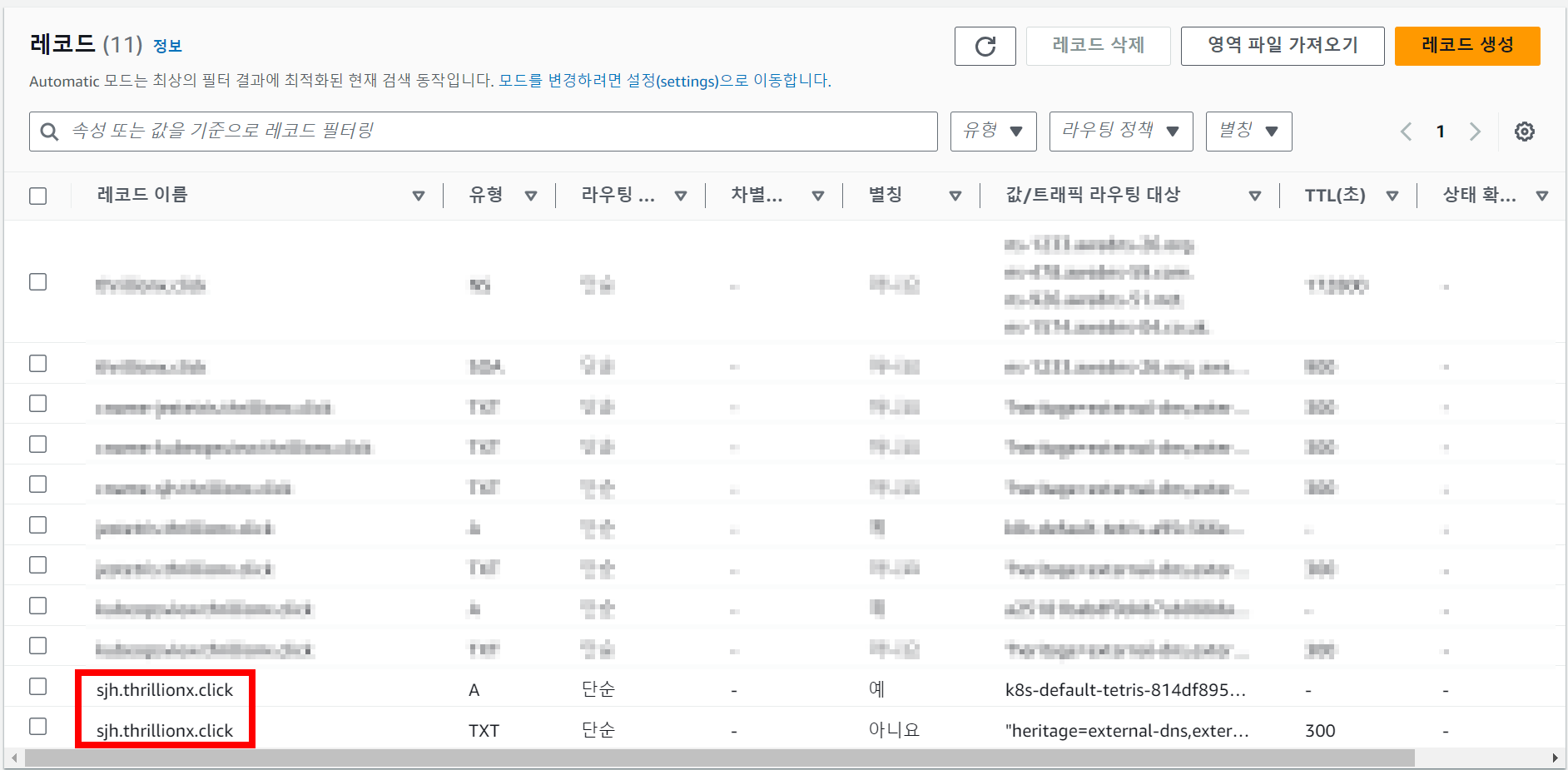
✅ 테트리스 연결 확인 : 크롬 시크릿창에 sjh.thrillionx.click 입력
4. T.S
➜ 계속해서 레코드가 올라갔다 내려가는 문제
helm repo add bitnami https://charts.bitnami.com/bitnami

helm repo update

helm install external-dns bitnami/external-dns -n kube-system --set provider=aws --set aws.region=us-east-1

kubectl annotate service khtetris external-dns.alpha.kubernetes.io/hostname=khtetris.thrillionx.click

dig +short khtetris.thrillionx.click

kubectl annotate service khtetris "external-dns.alpha.kubernetes.io/hostname=khtetris.$mydns"

kubectl annotate service kube-ops-view -n kube-system "external-dns.alpha.kubernetes.io/hostname=kubeopsview.$mydns"

dig +trace tetris1.thrillionx.click
** 지우기 **
eksctl delete cluster --name $CLUSTER_NAME \ && aws cloudformation delete-stack --stack-name $CLUSTER_NAME
** 참고 **
https://repost.aws/ko/knowledge-center/eks-set-up-externaldns
Amazon EKS로 ExternalDNS 설정
Amazon Elastic Kubernetes Service(Amazon EKS)를 사용하여 ExternalDNS를 설정하고 싶습니다.
repost.aws
https://github.com/kubernetes-sigs/external-dns
GitHub - kubernetes-sigs/external-dns: Configure external DNS servers (AWS Route53, Google CloudDNS and others) for Kubernetes I
Configure external DNS servers (AWS Route53, Google CloudDNS and others) for Kubernetes Ingresses and Services - kubernetes-sigs/external-dns
github.com
'AWS' 카테고리의 다른 글
| [ 10 ] - prometheus (0) | 2024.10.02 |
|---|---|
| [ 9 ] - 모니터링 (0) | 2024.09.30 |
| [ 7 ] - EKS Storage Monitoring (0) | 2024.09.26 |
| [ 6 ] - EKS Storage : Snapshot Controller (0) | 2024.09.25 |
| [ 5 ] - pv, pvc 관련 실습 (0) | 2024.09.25 |