1. Hardware Requirements
• OS : Ubuntu 22.04 Server
• 16 CPU Cores
• 32 GB RAM
• 60 GB Harddisk
☑️ lsb_release -a로 확인 가능
2. 기본 의존성 설치
sudo apt update && sudo apt upgrade -y
sudo apt install -y git curl apt-transport-https ca-certificates gnupg lsb-release jq python3-pip

# Kubeflow Pipelines SDK는 2.14.3으로 고정
pip install kfp==2.14.3
3. AIMLFW 저장소 받기
cd ~
git clone -b l-release https://gerrit.o-ran-sc.org/r/aiml-fw/aimlfw-dep
cd aimlfw-dep
4. Helm 설치 수정사항
• tools/helm/install_helm.sh 수정 → Helm 최신 release URL 사용
#==================================================================================
#
#       Copyright (c) 2022 Samsung Electronics Co., Ltd. All Rights Reserved.
#
#   Licensed under the Apache License, Version 2.0 (the "License");
#   you may not use this file except in compliance with the License.
#   You may obtain a copy of the License at
#
#          http://www.apache.org/licenses/LICENSE-2.0
#
#   Unless required by applicable law or agreed to in writing, software
#   distributed under the License is distributed on an "AS IS" BASIS,
#   WITHOUT WARRANTIES OR CONDITIONS OF ANY KIND, either express or implied.
#   See the License for the specific language governing permissions and
#   limitations under the License.
#
# ==================================================================================
# Reference: https://helm.sh/docs/intro/install/

# 최신 get-helm-3 스크립트 다운로드
curl -fsSL -o get_helm.sh https://raw.githubusercontent.com/helm/helm/refs/heads/release-3.18/scripts/get-helm-3

# 실행 권한 부여
chmod 700 get_helm.sh

# 원하는 버전 설치 (3.18.6)
./get_helm.sh --version 3.18.6
- 실행
./install_helm.sh
helm version   # 버전 확인 (v3.18.6 이어야 함)
➡ 참고 : https://gerrit.o-ran-sc.org/r/c/aiml-fw/aimlfw-dep/+/14917
https://gerrit.o-ran-sc.org/r/c/aiml-fw/aimlfw-dep/+/14917
gerrit.o-ran-sc.org
5. Recipe 파일 수정
- VM IP, datalake 관련 항목 수정
- InfluxDB를 쓸 경우 bucket, token, org 값 입력
6. PostgreSQL/Cassandra 설치 | T.S 중간에 waiting pod error가 나서 따로 설치함
- 문제: bitnami/postgresql 이미지 Pull 실패 (공식 지원 종료 / Brownout 영향)
- 해결: bitnamilegacy/postgresql:14.11.0-debian-12-r9 이미지로 교체
- bin/install_databases.sh 수정
helm install tm-db bitnami/postgresql \
  --namespace traininghost \
  --set image.repository=bitnamilegacy/postgresql \
  --set image.tag=14.11.0-debian-12-r9
- PVC 충돌 시: kubectl delete pvc data-tm-db-postgresql-0 -n traininghost 로 초기화 후 재설치
7. InfluxDB 설치
- 설치
helm repo add bitnami https://charts.bitnami.com/bitnami
helm install my-release bitnami/influxdb --version 5.13.5- Token 확인
kubectl get secret my-release-influxdb -n default -o jsonpath="{.data.admin-user-token}" | base64 --decode- Org/Bucket 생성
kubectl exec -it <influxdb-pod> -- influx org list -t <TOKEN>
kubectl exec -it <influxdb-pod> -- influx bucket create -n UEData -o primary -t <TOKEN>
8. TrainingHost 설치
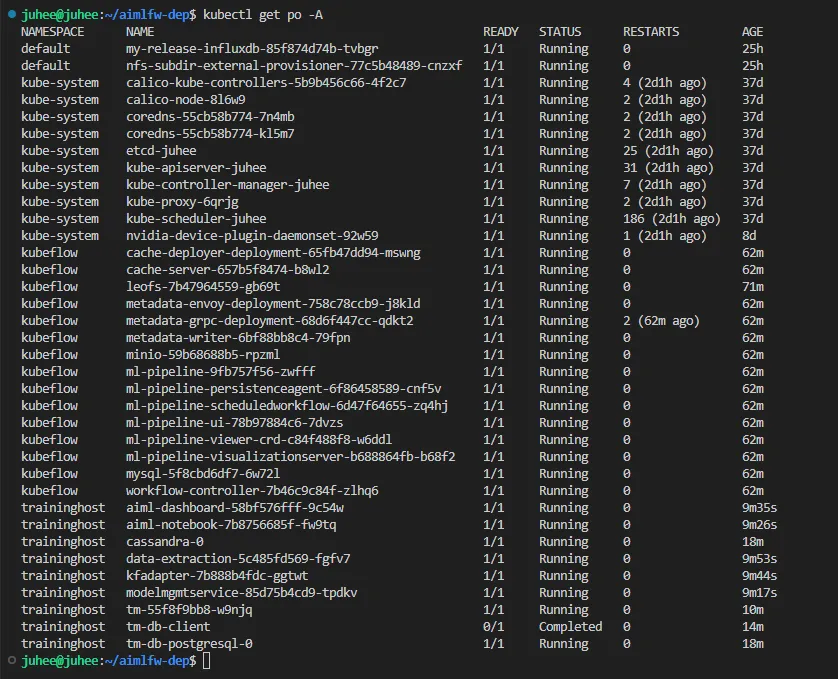
- kubeflow 네임스페이스: cache, metadata, ml-pipeline, mysql 등 Running
- traininghost 네임스페이스: cassandra, tm-db-postgresql, modelmgmtservice 등 Running
cd ~/aimlfw-dep
bin/install_traininghost.sh

# 설치 확인
kubectl get pods -A
9. FeatureGroup & Model 등록
- FeatureGroup 등록
curl --location 'http://<VM-IP>:32002/ai-ml-model-training/v1/featureGroup' \
--header 'Content-Type: application/json' \
--data '{
  "featuregroup_name": "testfg",
  "feature_list": "pdcpBytesDl,pdcpBytesUl",
  "datalake_source": "InfluxSource",
  "enable_dme": false,
  "host": "my-release-influxdb.default",
  "port": "8086",
  "bucket": "UEData",
  "token": "<INFLUX_DB_TOKEN>",
  "measurement": "liveCell",
  "db_org": "primary"
}'
- 모델 등록
curl --location 'http://<VM-IP>:32006/ai-ml-model-registration/v1/model-registrations' \
--header 'Content-Type: application/json' \
--data '{
  "modelId": {"modelName": "modeltest1", "modelVersion": "1"},
  "description": "This is a test model.",
  "modelInformation": {
    "metadata": {"author": "juhee"},
    "inputDataType": "pdcpBytesDl,pdcpBytesUl",
    "outputDataType": "pdcpBytesDl,pdcpBytesUl"
  }
}'
참고 : https://docs.o-ran-sc.org/projects/o-ran-sc-aiml-fw-aimlfw-dep/en/latest/installation-guide.html